Jan 22, 2011 Guide : How to Downgrade/Upgrade PSP Custom Firmwares with Hellcat's Recovery Flasher ver. 1.65


I want to remake a new guide on how to How to Downgrade/Upgrade PSP Custom Firmwares with Hellcat's Recovery Flasher but I failed. No matter how hard I try, I cannot snap any photos of Recovery Flasher. I'm so frustrated!=.=! Never mind. In order to cure this frustration, I have decided to released this short guide for you guys. It is a simple guide and maybe it is not sufficient enough to view the whole process, but it will help you somehow. So, this is a guide  How to Downgrade/Upgrade PSP Custom Firmwares with Hellcat's Recovery Flasher ver. 1.65.

Warning:
Never attempt to install this tool on PSP 2000 (TA088V3)/3000/GO. 
You may brick you PSP


The guide consists of the following parts:
  1. Hellcat's Recovery Flasher ver. 1.65 installation
  2. Select your target pbp file
  3. Run Hellcat's Recovery Flasher ver. 1.65.

STEP 1

You need to install Hellcat's Recovery Flasher ver. 1.65 (Basic Installation). 


STEP 2

Next, you will need to choose a firmware pbp file. Select your target pbp file.

Let's say, for instance, I want to downgrade my PSP from firmware 6.35 to 6.20. And then I need to place firmware 620 pbp file right into root of my memory stick.

I'm already provided a few firmware pbp files.

Firmware pbp files.

Installation Guide:

Note : X-XX is for firmware version

1)Extract FWX-XX,rar.


2)Just copy XXX.PBP and paste it right into your root of memory stick>>.......


STEP 3

Now, it's time to run your Hellcat's Recovery Flasher ver. 1.65.

The method in this step is quite similar to the previous tutorial. You can refer the ' previous tutorial'  in order to run Hellcat's Recovery Flasher

Guide : How to run Hellcat's Recovery Flasher ver. 1.65 

For further guide, please refer to the previous post.

[Click HERE to see the previous guide]

.........................................................................................

Read more >>
Digg it StumbleUpon del.icio.us

Dec 25, 2010 6.20 TN-A (HEN) + Prometheus ISO Loader [New Installation Guide]

HoHo^^...I'm finally able to post this guide. So, this guide is intended to help you load ISOs game on your PSP with official firmware 6.20. This guide includes installation of 6.20 TN-A, Prometheus ISO Loader, and Patapon2 [Demo], as well as all HBL exploit, and  information on how to run ISOs game on PSP.


This guide is organized into the following steps:
  1. Official Firmware 6.20 installation guide.
  2. Patapon 2 demo installation guide.
  3. Half Byte Loader + 6.20 TN-A (HEN) + Prometheus ISO Loader (Repack) installation guide.
  4. Guide to run 6.20 TN-A (HEN)
  5. Guide to run ISO with  Prometheus ISO Loader.

 Words of advice:
  • Backup and delete seplugins folder in your MS before you start the installation because some of homebrew plugins cause compatibility problems


So, what do you need to run ISOs game on your PSP with official firmware 6.20?

 Requirement:


STEP 1 ( If your PSP currently has the firmware 6.20 operating system, skip this step)


STEP 2 ( If you already have Patapon 2 demo running on your PSP, skip to step 3)


STEP 3
We have four different repack files and each one contains Half Byte Loader + 6.20 TN-A (HEN) + Prometheus ISO Loader . Let's start with PACK 1. Download the PACK 1.

Note* Each repack file give different compatibility. You need to test it one by one.

Repack Files:

Installation Guide: * # is the no. of repack file.


1) Extract PACK #.rar.


2)Just copy these folders and a bin file and paste them right into your root of memory stick>>.......

Merge all the folder and replace all files.


If you need further explanation on plug-in installation or application installation, please refer the links below.


STEP 4 (Guide to run 6.20 TN-A (HEN) )

1. Now, let's run your Patapon 2 Demo.


You, will see this screen. Select 'No' to proceed


Next, choose 'Yes' to continue.


Patapon 2 main menu. Select continue to load wololo savedata.


Load the Game data. *Boot icon may different-depending on 
the PACK that you installed on your MS


 Press [R Trigger] to load HBL Menu


This is HBL Menu. Select Hen to load 6.20 TN-A (HEN). Your PSP screen
will blank for a moment. After the process finish, it automatically loads your PSP XMB.


  1. How do you check if it was successfully installed? You can press [SELECT] button on your XMB.
  2. TN Vsh should be able to load on your PSP screen.
If TN Vsh won't loads, it means that you have failed to install 6.20 TN-A (HEN).

What do you need to do?
  1. Just repeat the step 4 for two or three times.
  2. If it no good news, install the PACK 2. Repeat step 3 and 4.
  3. If you have no luck with PACK 2, just install the others PACK.
OR
  1. You can install the latest 6.20 HEN : 6.20 TN-B [Click HERE]

    Note: Avoid problems during replacing PACK. How?
    1. Delete your current PACK before attempt a new PACK.
    2. You can delete Game data via your PSP XMB >> Game >> Save Data Utility.
    3. Delete Wolo Game data.
    4. You can delete h.bin and hbl folder manually on your MS.

    STEP 5 ( Guide to run ISO with  Prometheus ISO Loader)

    If you have already successfully installed 6.20 TN-A (HEN), now, let's run Prometheus ISO Loader !

    On your XMB >> Game >> Memory Stick >> Prometheus ISO Loader.


    So, this is Prometheus ISO Loader. Execute your ISOs from here.


    That's all. It works for me. I hope, it works for you too..

    Additional information.
    • You can put your ISOs into ISO folder on the root of your MS. If there's no ISO folder, just create one.
    • You have 80% possibility of success. This guide won't work on PSP 4g mobo.
    Read more >>
    Digg it StumbleUpon del.icio.us

    Dec 9, 2010 Guide on how to patch Prometheus-4 on ISO by using ISO Tool v1.93 : PSP Guide

    Well, well, well guys..We meet again. As I promised, here is a guide on how to patch Prometheus-4 on ISO by using ISO Tool v1.93. I have tested all the steps on 3 different Custom Firmwares and they are : 5.03 Gen C, 5.50 Gen D3, 5.00 m33-6. Mine seems to work fine, the game run nicely, and opening video loads every time I start the game. Pretty Cool! Hope it works for you too.

    Tested on: 
    • Monster Hunter Portable 3 (game run without problem but opening video not work on D3/M33 T.T )
    • WWE Smackdown vs Raw 2011 (Tested)
    •  Yu-Gi-Oh 5D's Tagforce 5 USA (still in progress) 
    • Togainu no Chi - tested by Zelos of the West 
    • winning eleven 2011 - tested by Francis Rubik 
    If you tested this guide on other games, let us know if it works or not for you. We are happy if you could share the result with us.

    **Some say that Monster Hunter Portable 3 opening movie should works.

    Requirement:
    • PSP Custom Firmware enable : 5.03 Gen C : 5.50 Gen D3 : 5.00 m33-6
    • Untouched ISO
    • ISO Tool ver 1.93 (Edited version) [Download Here]
    • 636prx file [Download Here]
    Where should we start?

    Firstly, please disable all your PSP plug-ins

    Patch Guide:

    Step 1:

    Install ISO Tool ver 1.93 (edited version). If you need installation guide 


    Step 2: 

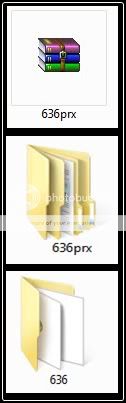
    1) Extract 636prx.rar.


    2) Copy 636 folder and paste it right into the root of memory stick>> seplugins folder ....


    Step 3

    On your PSP XMB>> Games>> Memory Stick>>  Iso Tool ver 1.93

    1.  This is ISO Tool v1.93 main menu.
    2. Select your destination ISO.
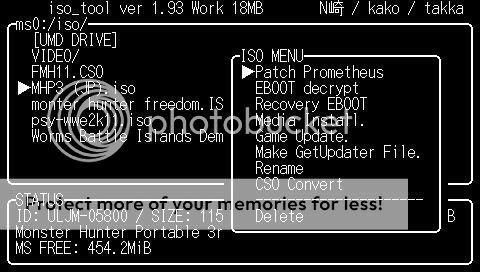
    3. Then, press [Circle] and you should be able to see ISO MENU.
    4. Select 'Patch Prometheus'.
     .....................................................................

    1. Now, you are in 'Prometheus path' menu.
    2. Select 'prometheus4/' and enter
    3. Choose 'Yes' to patch.
    4. ............................................................ 
    1. You will see the main menu again.
    2. Now, press [TRIANGLE] button to prompt its' SYS MENU.
    3. Select 'CFW Change' and enter to proceed
    4. ............................................................. 
    1. You'll able to see 'CFW Path'
    2. Select 'peagasus_plugin_on/' and enter.
    3. Choose 'Yes' to start.
    4. ........................................................ 
      For those who are using 5.03 Gen C, you are done now. Now you can test your new patched game on your PSP.
    1. 5.50 Gen D3 users, please continue to the step 4
    2. 5.00 m33-6, please continue to the step 5

    Step 4 (only for 5.50 Gen D3 users)

    1. Yet again you will see  ISO Tool v1.93 main menu.
    2. Press [TRIANGLE] button to view 'SYS MENU'.
    3. Select 'CFW Change' and enter to proceed.
    ...................................................................................

    1. You will see 'CFW Path' menu for the second time.
    2. Select '550_gen_d3_use_patch/' and enter.
    3. Hit 'Yes' to patch.
    .......................................................................................

    1. You'll return to  ISO Tool v1.93
    2. Select targeted ISO and hit [CIRCLE] button.
    3. You should see ISO Menu.
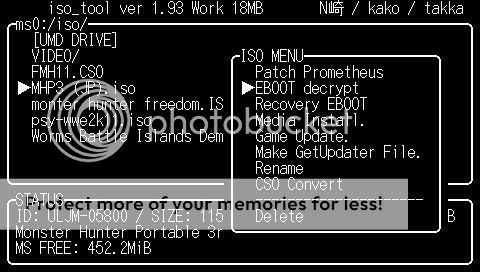
    4. Select Eboot decrypt and enter.
    ..............................................................................

    You will now be asked for a few of configuration questions.
    The answer you should choose:
    1. Store a backup of Eboot bin? = Yes
    2. Enable the version Patch?= No
    3. Do you want to start?= Yes
    Cheers..Now you're finished. Exit the ISO Tool and lets test the new patched game.

    ............................................................................

    Step 5 (only for 5.00 m33-6 users)

    1. Yet again you will see  ISO Tool v1.93 main menu.
    2. Press [TRIANGLE] button to view 'SYS MENU'.
    3. Select 'CFW Change' and enter to proceed.
    ............................................................................


    1. You will see 'CFW Path' menu for the second time.
    2. Select '500_M33_use_patch/' and enter.
    3. Hit 'Yes' to patch.
    .....................................................................


    1. You'll return to  ISO Tool v1.93
    2. Select targeted ISO and hit [CIRCLE] button.
    3. You should see ISO Menu.
    4. Select Eboot decrypt and enter.
    ....................................................................................


    You will now be asked for a few of configuration questions.
    The answer you should choose:
    1. Store a backup of Eboot bin? = Yes
    2. Enable the version Patch?= Yes
    3. Do you want to start?= Yes
    Cheers..Now you're finished. Exit the ISO Tool and lets test the new patched game.

     Credits:

    Takka
    LZ
    Windjai
    PSPISO crews
    ..................................................................
    Read more >>
    Digg it StumbleUpon del.icio.us

    Dec 4, 2010 Video leaked of PlayStation Phone or 'Zeus Z1' : PSP News

    Check it out guys!! I just found videos of PlayStation Phone or 'Zeus Z1' on the net. It's really pretty awesome. Finally, we can have some real android gaming. At present, not much information is available for this upcoming gadget. It seems that Sony is silent as to the specifications of this upcoming phone. However, there is a sample shot taken with this phone. Instead of talking about Zeus, let's look into some prove below.


    ...................................................................................................................
    ...................................................................................................................

    So, what do you think?
    .........................................................
    Read more >>
    Digg it StumbleUpon del.icio.us

    Dec 2, 2010 No more Prometheus. Liquidzigong has left PSP scene : PSP News

    Can this news  be true? Is he truly left us? I was wondering myself after reading some articles regarding Liquidzigong.  Liquidzigong is a valuable person in PSP scene. An important man. He has up rose the scene by releasing a few of critical updates on the Custom Fimwares. Prometheus ( The plug-in that let your PSP run or play the latest PSP games) is one of his precious projects. He also promised to release his new Prometheus which can make our PSP to run the latest released Monster Hunter: Monster Hunter 3. However, now, the promised is no more.

    The rumors said, he needs to leave the scene because of his own safety. He has been threatened with jail over somebody if he still continues on his project. I can see that he has no other choice but to resign from the scene. He left the resignation message on a forum, and also you can find the message from his tweeter account.


     Source:     PSPKing.de            blog.livedoor.jp           Twitter             a9vg
     

    Even so, the news is not meaning that PSP scene has finally end. Liquidzigong not only left scene but he also left some information regarding his future projects. Perhaps, the new leaves will bring us more good news in the scene.
    Read more >>
    Digg it StumbleUpon del.icio.us

    Nov 29, 2010 Take snapshot of anything on PSP screen [Screenshotbmp.prx] : PSP Plug-ins

    As requested, this is a guide on how to capture an image on your PSP screen. There a lot of plug-ins which are able to take a screen shot but each of them has difference features. Based on my experiences, I prefer Screenshotbmp.prx as the best image capture plug-in. Why? Screenshotbmp is a simple plug-in, easy to use and fewer crashes. If you don't believe me, get one and try it for yourself.

    Requirement:

    Installation Guide:

    Step 1

    1)Extract screencapture.rar.


    2) Copy all the files and paste them right into the root of psp memory stick/seplugins folder. If there already had game, pops and vsh files, copy this blue command ms0:/seplugins/screenshotbmp.prx 1 and paste it in each of the files. Save.

    For detail instruction, please refer plug-ins installation guide. [Plug-ins installation guide]


    Step 2

    After you have successfully installed the plug-in, now you need to enable it. Please refer the guide on how to enable plug-ins. [Guide on how to enable plug-ins]


    Step 3

    How to run Screenshotbmp.prx?

    In order to make the plug-in works;
    • for 5.50/5.00 Custom Firmware user, you need to restart/reboot your PSP.
    • if you're 5.03 Gen user, just run any games or applications before you can activate the plug-in. This action will refresh your system.
    Step 4

    Take a shot


    Just press the [NOTE] button to snap your image.


    You should see your PSP’s screen inverting it’s colors (you’ll know it when you see it). This is the screenshot plugin working.


    Read more >>
    Digg it StumbleUpon del.icio.us

    Nov 26, 2010 PSP Motherboard compatible list : PSP Tips

    This should an old issue to discuss. However, I thought that I should have this topic on my blog since it is quite important, especially for those who are new in PSP Homebrew. You should master about PSP motherboard compatibility before you can start to be part of Homebrew users. Why? This is because some of the homebrew applications, plug-ins or even themes can cause your PSP brick or wreck. This knowledge will guide you while you're choosing homebrew made applications for your PSP. Before you see the lists below, let's read short descriptions about Custom Firmware, Pandora and HEN that I have collected.


    Custom Firmware:

    CFW is a short cut for custom firmware. CFWs are Firmwares which were changed to allow homebrews to run.

    Pandora:

    Pandora battery is a tool used to breathe new life into your PSP. It is used to Unbrick a PSP that was previously bricked bricked by an unsuccessful hack attempt. Also the Pandora Battery in combination with a “Magic Memory Stick” can be used to load third party PSP games, PSP Roms, PSP Wallpapers and many other addons to enhance the use of your PSP.

    HEN:

    HEN is "Homebrew Enablers" for PSP. It run via TIFF [an image file] and a bunch of files [.dat] in the root of the Memory Stick. ChickHEN is a HEN for firmware 5.03. It runs on any PSP running 5.03, including PSP 3000's.


     Info:

    Motherboard:

    You can read further information about PSP Motherboard on the post provided: [Click HERE]


    CFW

    As explain in description above, CFW stand for custom firmware. The final released CFW is 5.50 Gen D3 and CFW are only working on old psp motherboards. CFW will directly assign  new codes in  PSP flash 0  and keep the codes permanently/available in PSP system, although after you reboot your PSP. 


    Status

    All motherboard are hackable except for GO, PSP 3000 and PSP 2000 with TA088v3. It means that we can use pandora to downgrade/upgrade and unbrick these motherboards without any problem.


    Pandora

    Pandora means that the motherboard is capable of producing pandora.


    HEN

    Until now, HEN working on any motherboard and the motherboard must be running with 5.03 firmware.

    HBL

    All motherboards are able to use Half Byte Loader, but HBL only works on PSP with firmware 5.51 until 6.20. 


    How to determine your PSP specification?

    The best way to discover your PSP spec is by using a homebrew application : PSPiden.


    Read more >>
    Digg it StumbleUpon del.icio.us

    Nov 25, 2010 Half Byte Loader working on Firmware 6.35 : PSP News


    Something cool just happen. The HBL developer, neuron announced that he has found a way to make HBL working on Firmware 6.35. This awesome hacker cracks this firmware just after Sony has released it less than 24 hours ago. This is really great news and we can say, this is our side happiness since Total Noob will release his new HEN soon. Neuron also provided a video proof via youtube. We can see that neuron really working on HBL and he contributes so much about HBL recently especially on the development of HBL alternate menu. We believed this isn't a prank and he can be trusted. Someone from wololo.net also has contacted him to confirm about this news. Here, you can watch the video below.


    Quote:

    Half Byte Loader work on OFW6.35 : )

    I will not release it soon.
    Because 6.20TN will be released by Total_noob.

    Maybe, the idea is not bad. This HBL should be our backup plan on the future. In the meantime, the hackers still make discussion about this HBL potential. Perhaps, this is a sign that PSP homebrew has no end. Best of luck guys.
    Read more >>
    Digg it StumbleUpon del.icio.us

    Nov 24, 2010 Great offers on PlayStation Stores [Game Store Update 24th Nov 2010]: PSP News


    Sony just offered some great deals on their PlayStation Store. They have games, they have demos and they have more add-ons that available only for their PSN members. For those who have some money, there's no time to waste because the offers only valid until 8 December 2010. You should see the lists that I have copied below before you decide to grab something on the store. I'm also should remind you, this feature is not available for those who are using homebrews.


    Special Offers
    • Prince of Persia: Revelations (PSP)(€ 19.99, now € 9.99) 
    • Prince of Persia: Rival Swords (PSP) (€ 19.99, now € 9.99)  
    • Prince of Persia: Forgotten Sands (PSP) (€ 29.99 now € 19.99)  
    • Mahjong Artifacts (mini)  € 4.99 now € 2.99)  
    • Gold Fever (mini)( € 4.99 now € 2.99)

    Demos (PSP)

    • Legends of War: Patton’s Campaign Rating: PEGI 16
    • Worms: Battle Islands (£15.99 /€19.99) Rating: PEGI 12


    Add-On Game Content (PSP)
    •  Buzz! Quiz World – Decades Quiz: 90s (£3.19/€3.99) Rating: PEGI 12


    Premium Theme Designs (PSP) 
    • Von Chrono Themes
      • Inner Warrior – 2 (£0.95/€1.19)
      • Visions – 1 (£0.79/€0.99)
      • Zombies On Tv – 01(£0.95/€1.19)
      • Zombies On Tv – 02 (£0.95/€1.19)


      Read more >>
      Digg it StumbleUpon del.icio.us

      Sony released new PSP firmware ( Firmware 6.35 ) : PSP News


      Sony has released new PSP System Software, now at version 6.35. They (Sony) said, version 6.35 will brings you a new way of listening to music through PSP just after Qriocity lunch their cloud-based digital music 'Music Unlimited'. Since there is a new feature, it should has a little change on PSP XMB (XrossMediaBar).


      A quote from the original article : http://blog.us.playstation.com


      This is a minor update that prepares your PSP system for the upcoming launch of “Music Unlimited powered by Qriocity” – a new, cloud-based, digital music service from Sony that will give music lovers access to millions of songs stored and synchronized through the cloud. A new icon for the service will be added to PSP’s XMB (XrossMediaBar) under the “Music” category. You can read more about Music Unlimited powered by Qriocity here, and we’ll report back when a launch date is announced.

      There is the update file:

      Warning:

      There's no way turning back after you have update your PSP firmware. You won't able to play patched ISO/CSO games, install homebrew application and others unless your PSP is pandorable. If you're homebrew users, please bear in mind about this issue especially for PSP GO, PSP 3000 and 2000 TA088v3 users.


      Firmware 6.35:


      Read more >>
      Digg it StumbleUpon del.icio.us

      Nov 23, 2010 PSP Motherboard Specification : PSP Tips


      For those who interested in discovering about main hardware components that operating on PSP motherboard, I have provided some further detail information regarding this issue.  I hope this info will help you to arise your knowledge about PlayStation Portable. 


      Firstly, you should know about 3 main components that running on PSP motherboard and they are:


      • Tachyon
      • Baryon
      • Pommel 

      What are they?

      They are important Motherboard IC's that working inside your PSP.


      Further discription

      BARYON

      • The codename for the SYSCON microcontroller IC (refer to SYSCON for more information).

      POMMEL
      • The codename for the Power Control IC. A DC-DC converter controlled by SYSCON.

      TACHYON
      • The codename for the main CPU SoC IC. A Sony custom-made LSI which holds the main CPU (Allegrex), the VFPU coprocessor, the Media Engine CPU & its embedded DRAM, the Graphics Engine & its embedded DRAM, the AVC decoder, the Virtual Mobile Engine DSP, the KIRK & SPOCK crypto engines, and the 4KB embedded mask ROM which holds the PreIPL and routines to boot into service mode.

      SYSCON
      • The System Control microcontroller which handles everything from, controlling power to all devices (including the LCD, UMD drive, memstick, wlan, even the main cpu), keeping the date/time, sleep mode control, controls all external switches including all buttons & the analog nub as well as the headphone remote buttons/switches, LED control, main power & battery control, and even access to the PSP’s Service Mode (SYSCON is the chip responsible for detecting the 0xFFFFFFFF serial of the battery to enable service mode).

      So, where does Sony placed these components on your PSP motherboard?


      Let see the images below:


      Credit to SilverSpring : TA-079

      TA-086


      Since you already knew about these components,you also should know
      the CPU (Tachyon), Syscon (Baryon) and Pommel are different on different PSP mobos (motherboard). Sony keep releasing new motherboards and firmwares to stop the hackers exploiting PSP beside improving some systems in PSP. That why, the hackers found hard in releasing new Custom Firmwares.  


      Motherboard type: Phat version (01g)
      Motherboard
      Tachyon
      Baryon
      Pommel
      TA-079 v1
      0×00140000
      0×00030600
      123
      TA-079 v2
      0×00200000
      0×00030600
      123
      TA-079 v3
      0×00200000
      0×00040600
      123
      TA-081
      0×00300000
      215;00040600
      123
      TA-082
      0×00400000
      215;00114000
      123
      TA-086
      0×00400000
      215;00121000
      123


      Motherboard type: Slim & Lite version (02g)
      Motherboard
      Tachyon
      Baryon
      Pommel
      TA-085
      0×00500000
      0×0022B200
      123
      TA-085 v2
      0×00500000
      0×00234000
      123
      TA-088 v1
      0×00500000
      0×00243000
      123
      TA-088 v2
      0×00500000
      0×00243000
      123
      TA-088 v3
      0×00600000
      0×00243000
      123
      TA-090
      0×00600000
      0×00243000
      123


      Motherboard type: 3000 (03g)
      Motherboard
      Tachyon
      Baryon
      Pommel
      TA-090 v2
      0×00600000
      0×00263100
      Pommel: 132


      Credit and Source:
      Read more >>
      Digg it StumbleUpon del.icio.us

      6.20 TN-A (HEN) almost 100 % complete : PSP News


      Today, I got a new tweet from yatagami_rinne : the author of http://blog.livedoor.jp. Regarding of information given, Total_Noob almost complete his significant project: 6.20 TN-A (HEN) and if nothing going wrongs, this new HEN will release in this mid-December 2010. However, I have no detail explanation about this.  Sure enough, this news brings hope and joy to 6.20 users especially for those who are using PSP 3000 and 2000 TA088v3.

      Based of some rumors, Total_Noob will release 6.20 TN-A (HEN) at one of famous PSP Homebrew site: PSPGen.


      6.20 TN-A (HEN) features:


      • Reversed all systemctrl exports
      • Added USB battery charging
      • Added ability to watch 480x272 avc video
      • Added feature to skip gameboot
      • Added possibilty to hide PIC0.PNG and PIC1.PNG
      • Fixed issue with some VLF homebrews
      • Added possibilty to adjust CPU speed
      • Added fake region feature
      • Added TN network update
      • Resolved all important NIDs
      • Encreased homebrew compatibilty
      • Compressed rebootex

      Wish for success...


      Source:

      http://blog.livedoor.jp
      http://total-noob.blogspot.com
      Read more >>
      Digg it StumbleUpon del.icio.us

      Nov 17, 2010 Guide on how to dump and decrypt PSP firmwares by using PSARDumper: PSP Guides


      Previously on Fixmypsp, I have introduced a handy PSP Hombrew application ; PSARDumper 6.XX. Homebrew coder, bbtgp has released this application and  now it can support firmware 6.00, 6.10 and 6.20. For those who are still have no idea about this application, PSARDumper 6.XX will help you to dump and decrypt PSP firmwares. It really useful when you need some useful plug-ins or others files that comprised inside any PSP firmwares (.pbp files). In this post, I will show you a guide on how to dump and decrypt PSP firmwares by using PSARDumper.

      Requirement:

         Tutorial:

        Step 1:

        Please install PSARDumper on your PSP: [Click HERE to see a guide on how to install PSARDumper 6.XX]


        Step 2:

        Get yourself a target official firmware.

        Below is a sample firmware and I have used eboot 6.20 as my target firmware.


        1) Extract FW620ebootrenamed.


        2) Normally, you will see an eboot.pbp file after you extracted your downloaded PSP official firmwares.

        Copy the target 'EBOOT.PBP' file and paste it right into root of PSP Memory Stick (MS0:)


        Word of advice:

        • In case you got a .pbp file but labeled differently (620.pbp, 610.pbp etc...) from picture above, please rename and replace the 'number' with 'EBOOT '.


        EBOOT.PBP file on root of PSP Memory Stick (MS0:)


        Step 3:

        After you have successful paste the target EBOOT.PBP into the right place, now is the time to run your installed PSARDumper.
        • On your PSP XMB>> Games>> Memory Stick>>  New PSAR Dumper

        PSARDumper Main Menu


        • Just press [SQUARE] button to decrypt all the contents inside the target eboot.pbp.

        You need to wait until all the process finished. You will ask to press a button before you can exit the application.


        Step 4:

        The next step: get your decrypted files.
        • Connect your PSP to your PC and you will find a new folder called "F0", that's where all the decrypted files are.


        •  The decrypted files.


        You're done...
        Read more >>
        Digg it StumbleUpon del.icio.us
         
        Copyright 2010 Fixmypsp
        Carbon 12 Blogger template by Blogger Bits. Supported by Bloggermint