Dec 21, 2010 Takka ISO Tool minor update - ISO Tool 1.952 : PSP Homebrew Application

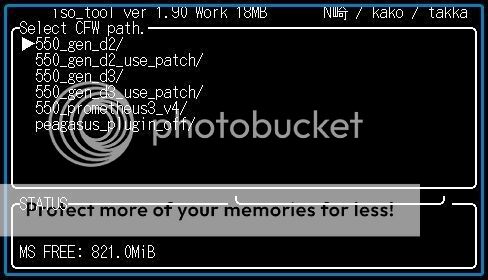
Not so exiting, but not so bad for minor update. Takka has released an update for ISO Tool that just includes a few fixes on auto_cfw option (refer the change log below) .The update brings the ISO Tool up to version 3.55. For those of you unfamiliar, ISO Tool allows you to patch  Eboot.bin (Binaries required to boot a UMD/ISO) on your PSP ISO then make the ISO compatible with Custom Firmware. Besides that, this application also will help you to ripp your UMD's, convert your ISO to CSO or vice versa and much more.


Change log: ( Google Translate)
  • [BUG] (auto_cfw) 5.00m33 plug-in system for peagasus.prx auto_cfw fixed 
  • [BUG] CFW adjust various display name 
  • [NEW] startup ms0: / ISO folder, create a changed to 
  • [NEW] Add (script) if the exists / not_exists 
  • [NEW] Add(script) set_plugin
  • [NEW] (script) Log Akira Osamu clarity files [BUG] (auto_cfw) auto_cfw libmp3.prx redo/undo
  • [BUG] (auto_cfw) "ms0: / seplugins/636/libmp3.prx" Fix to prevent copying if there is no flash 
  • [NEW] CFW script changed to provide all switching

Source: Takka blog

Requirement:

Warning:
This application (some functions) maybe can cause PSP 3000 or PSP 2000 
(TAv088v3 brick,so please use it with cautions.


Note:
Before you attempt to install this tool, if you've previous version of ISO Tool, it's best if 
you could remove it from your ms.


Installation Guide

 
Read more >>
Digg it StumbleUpon del.icio.us

Dec 12, 2010 New version of ISO Tool released; ISO Tool ver 1.95 : PSP Homebrew Application.

Hi, just wanted to keep you updated. Takka has released new version of ISO Tool; ISO Tool ver 1.95 Seems like there are some changes were made to previous released of ISO Tool. What does this application do? ISO Tool will allow you to patch  Eboot.bin (Binaries required to boot a UMD/ISO) on your PSP ISO then make the ISO compatible with Custom Firmware. Besides that, this application also will help you to ripp your UMD's, convert your ISO to CSO or vice versa and much more. This latest released of Iso Tool also support to patch the new EBOOT and .prx which is Prometheus. Do you think ISO Tool ver 1.95 will be able to patch your game without problem? I'm not sure either. Just download and test it for yourself.

Change log:
  • * 1.95
    [BUG] Fixed the bug can not successfully write the file
    [BUG] 5.50Prometheus3-v4_auto_cfw 5.03 in the Fixed peagasus_orig.prx to file
  • * 1.94
    [BUG] Prometheus3-v3 folder specified correct mistakes
    [BUG] 550_gen_d2 Fixed files remain under development
    [NEW] implement a script (see script_doc.txt)
    [NEW] on startup "script.txt" run immediately after it ends, if any, and the installer can easily use
    [BUG] game.txt line endings and document output from the LF CR LF corrected
    [NEW] auto_cfw integration (readme_auto_cfw.txt must be prepared in advance are listed)
    Switching the CFW, please refer to the readme_cfw.txt

    part auto_cfw
    [NEW] slightly improve the stability of recovery sleep after
    [BUG] 5.00/5.03 CFW on when using the Prometheus system, flash0 so fixed must be rewritten readme.txt
    [BUG] flash0 seplugins and banned from double reading (5.50 in the same system and the MS can use 5.00M33-6)
    [NEW] readme_auto_cfw.txt to describe the DEBUG mode
    [NEW] Prometheus3-v4 support
    [NEW] Prometheus3-v4 and prm.prx key.txt the ISO instead of changing to read from MS
    [NEW] prm.prm to rename prml3v3.prx/prml3v4.prx
    [NEW] 5.50 GEN-D2 operate the plug-in recommended changes to flash0 so unstable rewriting
    [NEW] custom soundtrack support the use of masks ライダークライマックスヒーローズオーズ
    (M33Driver on automatically at ms0: / seplugins/636/libmp3.prx used)
Source: Takka blog

Requirement:

Warning:
This application (some functions) maybe can cause PSP 3000 or PSP 2000 (TAv088v3 brick,
so please use it with cautions.


Installation Guide

Step 1
1)Extract iso_tool_195.rar


2)Just copy these three folders and paste them right into your root of memory stick>>.......

Merge all the folder and replace all files. 


Note:
  • If you currently have other plug-ins working on game.txt, just do nothing on game.txt file. Don't replace, don't copy when the PC ask you what to do with this file (game.txt). Leave this file in the destination folder.
  • After the process finished, copy this purple line ' ms0:/seplugins/peagasus.prx 1' to your current game.txt inside seplugins folder.
If you need further explanation on plug-in installation or application installation, please refer the links below.

If you need a guide on how to use ISO Tool or guide on to patch games by using ISO tool, the link below might help you.
 ......................................................................................................
Read more >>
Digg it StumbleUpon del.icio.us

Dec 9, 2010 Guide on how to patch Prometheus-4 on ISO by using ISO Tool v1.93 : PSP Guide

Well, well, well guys..We meet again. As I promised, here is a guide on how to patch Prometheus-4 on ISO by using ISO Tool v1.93. I have tested all the steps on 3 different Custom Firmwares and they are : 5.03 Gen C, 5.50 Gen D3, 5.00 m33-6. Mine seems to work fine, the game run nicely, and opening video loads every time I start the game. Pretty Cool! Hope it works for you too.

Tested on: 
  • Monster Hunter Portable 3 (game run without problem but opening video not work on D3/M33 T.T )
  • WWE Smackdown vs Raw 2011 (Tested)
  •  Yu-Gi-Oh 5D's Tagforce 5 USA (still in progress) 
  • Togainu no Chi - tested by Zelos of the West 
  • winning eleven 2011 - tested by Francis Rubik 
If you tested this guide on other games, let us know if it works or not for you. We are happy if you could share the result with us.

**Some say that Monster Hunter Portable 3 opening movie should works.

Requirement:
  • PSP Custom Firmware enable : 5.03 Gen C : 5.50 Gen D3 : 5.00 m33-6
  • Untouched ISO
  • ISO Tool ver 1.93 (Edited version) [Download Here]
  • 636prx file [Download Here]
Where should we start?

Firstly, please disable all your PSP plug-ins

Patch Guide:

Step 1:

Install ISO Tool ver 1.93 (edited version). If you need installation guide 


Step 2: 

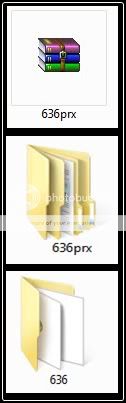
1) Extract 636prx.rar.


2) Copy 636 folder and paste it right into the root of memory stick>> seplugins folder ....


Step 3

On your PSP XMB>> Games>> Memory Stick>>  Iso Tool ver 1.93

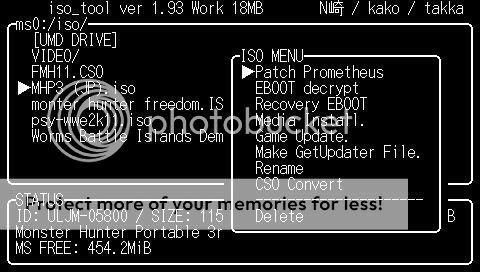
  1.  This is ISO Tool v1.93 main menu.
  2. Select your destination ISO.
  3. Then, press [Circle] and you should be able to see ISO MENU.
  4. Select 'Patch Prometheus'.
 .....................................................................

  1. Now, you are in 'Prometheus path' menu.
  2. Select 'prometheus4/' and enter
  3. Choose 'Yes' to patch.
  4. ............................................................ 
  1. You will see the main menu again.
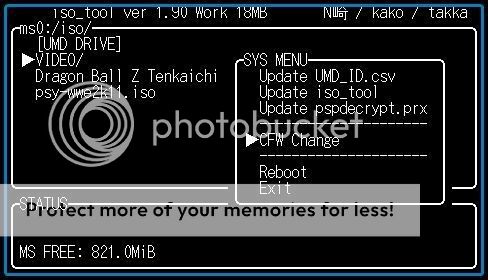
  2. Now, press [TRIANGLE] button to prompt its' SYS MENU.
  3. Select 'CFW Change' and enter to proceed
  4. ............................................................. 
  1. You'll able to see 'CFW Path'
  2. Select 'peagasus_plugin_on/' and enter.
  3. Choose 'Yes' to start.
  4. ........................................................ 
    For those who are using 5.03 Gen C, you are done now. Now you can test your new patched game on your PSP.
  1. 5.50 Gen D3 users, please continue to the step 4
  2. 5.00 m33-6, please continue to the step 5

Step 4 (only for 5.50 Gen D3 users)

  1. Yet again you will see  ISO Tool v1.93 main menu.
  2. Press [TRIANGLE] button to view 'SYS MENU'.
  3. Select 'CFW Change' and enter to proceed.
...................................................................................

  1. You will see 'CFW Path' menu for the second time.
  2. Select '550_gen_d3_use_patch/' and enter.
  3. Hit 'Yes' to patch.
.......................................................................................

  1. You'll return to  ISO Tool v1.93
  2. Select targeted ISO and hit [CIRCLE] button.
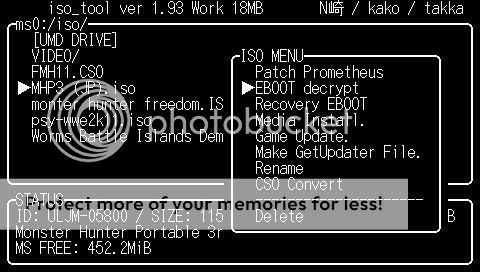
  3. You should see ISO Menu.
  4. Select Eboot decrypt and enter.
..............................................................................

You will now be asked for a few of configuration questions.
The answer you should choose:
  1. Store a backup of Eboot bin? = Yes
  2. Enable the version Patch?= No
  3. Do you want to start?= Yes
Cheers..Now you're finished. Exit the ISO Tool and lets test the new patched game.

............................................................................

Step 5 (only for 5.00 m33-6 users)

  1. Yet again you will see  ISO Tool v1.93 main menu.
  2. Press [TRIANGLE] button to view 'SYS MENU'.
  3. Select 'CFW Change' and enter to proceed.
............................................................................


  1. You will see 'CFW Path' menu for the second time.
  2. Select '500_M33_use_patch/' and enter.
  3. Hit 'Yes' to patch.
.....................................................................


  1. You'll return to  ISO Tool v1.93
  2. Select targeted ISO and hit [CIRCLE] button.
  3. You should see ISO Menu.
  4. Select Eboot decrypt and enter.
....................................................................................


You will now be asked for a few of configuration questions.
The answer you should choose:
  1. Store a backup of Eboot bin? = Yes
  2. Enable the version Patch?= Yes
  3. Do you want to start?= Yes
Cheers..Now you're finished. Exit the ISO Tool and lets test the new patched game.

 Credits:

Takka
LZ
Windjai
PSPISO crews
..................................................................
Read more >>
Digg it StumbleUpon del.icio.us

Dec 8, 2010 ISO Tool ver 1.93 released. Now support Prometheus3-v4/Prometheus4 patch! : PSP Homebrew Application

Hi there! I have good news from Takka: Japanese homebrew coder. He just released a new version of ISO Tool: ISO Tool ver 1.93. There are number of features included in this new released. And, of course, the most important feature is ISO Tool ver 1.93 now support Prometheus3-v4/Prometheus4 patch. For those who aren't familiar, ISO Tool is an application which it will will allow you to patch  Eboot.bin (Binaries required to boot a UMD/ISO) on your PSP ISO then make the ISO compatible with Custom Firmware. Besides that, this application also will help you to ripp your UMD's, convert your ISO to CSO or vice versa and much more.
.....................................................................

Change log 
  • [BUG] ISO files in the correct information acquisition
  • [NEW] Change the view to sort files
  • [NEW] Prometheus3-v4/Prometheus4 support patch
  • [NEW] Prometheus3-v4/v3 required to prm.prx key.txt change the ISO rather than reading from MS
  • [NEW] With the above, ms0: / seplugins / prm / a key.txt, prml3v3.prx, prml3v4.prx requires
  • [NEW] prm.prm to rename prml3v3.prx/prml3v4.prx
  • [NEW] Added a patch for the Prometheus mask ライダークライマックスヒーローズオーズ

Ok guys, I know you must be wondering if this released works on Monster Hunter Portable 3. Truthfully, I'm not sure either. But now, I'm still working on it and hopefully I will find the result as soon as possible. I will keep you updated if I have good news about this.

Ah..forgot to say. I'm currently planning to publish a new guide on how to patch an ISO with ISO Tool. Just waiting downloader to finish downloading a new Monster Hunter Portable 3 ISO. ^^
....................................................................................

Click HERE for :

Requirement:


Warning:
This application (some functions) maybe can cause PSP 3000 or PSP 2000 (TAv088v3 brick,
so please use it with cautions.


Installation Guide

Step 1
1) Extract iso_tool_193.rar


2) Copy iso_tool folder and paste it right into the root of memory stick>> PSP>> GAME>> ....

If you have problem on where to paste this folder, please refer to the Guide on how to install application provided.(Installation Guide)


Step 2

On your PSP XMB>> Games>> Memory Stick>>  Iso Tool ver 1.93


Screenshots

Screen shot

PSP 3000 and PSP 2000 TA088v3: Better careful with this function.


5.50 Gen users: You're able to undo your current CFW into 5.50 Gen D2
......................................................................................................................................
Read more >>
Digg it StumbleUpon del.icio.us

Nov 25, 2010 Takka released new ISO Tool ( ISO Tool ver. 1.92) : PSP Homebrew Application


Takka has released another update for his ISO Tool : ISO Tool ver 1.92 since he released ISO Tool ver. 1.91 a week ago. Nothing much. I just found a minor changes from this update and it should be that way and you also should realize it too. Perhaps, there is something important that we also don't realize about this update. So, just get one and figure out by yourself. For those who are still have no idea about this tool, ISO Tool will allow you to patch  Eboot.bin (Binaries required to boot a UMD/ISO) on your PSP ISO then make the ISO compatible with Custom Firmware. Besides that, this application also will help you to ripp your UMD's, convert your ISO to CSO or vice versa and much more. This latest released of Iso Tool also support to patch the new EBOOT and .prx which is Prometheus.


ISO Tool 1.92 updates
  • [NEW] pspdecrypt.prx shipped a replacement with the latest
  • [NEW] flash0 writing to you to be able to order without prx, flash0_w.prx removal
  • [NEW] Little Busters! (ULJM-05789) for installation media

Info:
 
For your information, I'm just figured out about 'Little Busters! (ULJM-05789) for installation media'. I can see, this update is really useful for those who want to play a new released Japanese game, Little Busters! Converted Edition. This game comes with two discs and it requires installation of the Memory Stick if the player wants to continue with DISC2. This installation process significantly reduces disk access, and gives more comfortable while playing the game!


Requirement:


Warning:
This application (some functions) maybe can cause PSP 3000 or PSP 2000 (TAv088v3 brick,
so please use it with cautions.


Installation Guide

Step 1

1) Extract iso_tool ver1.92


2) Copy iso_tool folder and paste it right into the root of memory stick>> PSP>> GAME>> ....

If you have problem on where to paste this folder, please refer to the Guide on how to install application provided.(Installation Guide)


Step 2


On your PSP XMB>> Games>> Memory Stick>>  Iso Tool ver 1.91


If you need a guide on how to use Iso Tool, you can 
refer the guide that I have provided

[Click HERE for guide on how to use iso tool]


Screenshots

PSP 3000 and PSP 2000 TA088v3: Better careful with this function.


5.50 Gen users: You're able to undo your current CFW into 5.50 Gen D2


    Read more >>
    Digg it StumbleUpon del.icio.us

    Nov 19, 2010 ISOTool v.1.91 now supports HBL released : PSP Homebrew Application


    Once again, Takka's ISO Tool have been updated for your homebrewing pleasure. ISO Tool v.1.91 : convert ISO to CSO, patch and decrypt latest PSP ISO games and make them compatible with your current Custom Firmware and newly added is, this released now can run on HBL. I don't know how much this application can works on HBL mode since I have no chance in activate HBL. So, for those who are HBL users, you can grab this application and test it for yourself. Besides that, Takka also fixed some bugs that occur in the previous released of ISO Tool.


    Changelog:


    • [NEW] HBL at startup Fixed the error reappears PRX read (FW 5.51 or higher will have to come out)
    • [NEW] HBL make changes when using the View menu,
    • [BUG] HBL Fixed a freeze when using at the end (if you return to exit the menu HBL, HOME Back to the case of the XMB)
    • [BUG] When you start "ms0: / test" was to remove fixed (remains of debugging)
    • [BUG] EBOOT.OLD fixed conversion was not possible to
    • [NEW] 5.50GEN-D3/D2 when patched in the farm system with "5.50GEN-pD ~" was to make the show
    • [NEW] 5.50GEN-D2 system supports plug-ins


    Warning:
    This application (some functions) maybe can cause PSP 3000 or PSP 2000 (TAv088v3 brick,
    so please use it with cautions.


    Requirement:


    Installation


    Step 1

    1) Extract iso-tool_191


    2) Copy iso_tool folder and paste it right into the root of memory stick>> PSP>> GAME>> ....

    If you have problem on where to paste this folder, please refer to the Guide on how to install application provided.(Installation Guide)


    Step 2


    On your PSP XMB>> Games>> Memory Stick>>  Iso Tool ver 1.91


    If you need a guide on how to use Iso Tool, you can 
    refer the guide that I have provided

    [Click HERE for guide on how to use iso tool]


    Screenshot

    PSP 3000 and PSP 2000 TA088v3: Better careful with this function.


    5.50 Gen users: You're able to undo your current CFW into 5.50 Gen D2


      Read more >>
      Digg it StumbleUpon del.icio.us

      Nov 18, 2010 Patch and Decrypt PSP ISO games with Iso Tool v. 1.90 : PSP Homebrew Applications


      A handy homebrew application, Iso Tool is underway with some serious improvement. Takka, Japanese PSP coder has released Iso Tool ver 1.90 ; a tool that let you to decrypt, convert and patch all ISOs straight from your PSP. Besides that, the new released also support to patch latest Eboot.bin (Prometheus3-v4) and making PSP ISOs working with Custom Firmware. From some information I gathered, this tool has ability to redo/undo/change your current PSP Custom Firmware by flashes some prx files to flash0**. I'm afraid this function can cause troubles to PSP 3000 and 2000 TA088v3 users. So please be careful while using this application.


      Changelog:

      • [BUG] 5.03GEN-C patch in the Prometheus, flash0 change the system rather than rewriting the plug-in
      • [NEW] menu command to remove rarely used
      • [NEW] plugins folder to add and prx, game.txt to add plug-in name / automate the process of disabling
      • [NEW] flash0 file is the same when writing to the rewriting does not like change
      • [NEW] Prometheus EBOOT.BIN patch modified to convert to upper case when you copy

      Prometheus3-v4 patch use procedures
      Requirements: 5.50GEN-D3/D2, 5.00M33-and 6 5.03GEN-C (PSP-3000/2000)

      • Prerequisite: Prometheus3-v4 6xxModules shipped with the files in the ms0: / seplugins/6xx / Copy

      • 5.50GEN-D3/D2 case
        • The CFW in iso_tool 550_gen_d2_use_patch or switch to switch 550_gen_d3_use_patch
      • 5.03GEN-C case
        • The CFW iso_tool peagasus_plugin_on switch to switch on (5.03Prometheus3-v4 If you have not already available, 503_gen-c_use_patch used)
        • 5.00M33-six cases The CFW iso_tool peagasus_plugin_on switch to switch on (5.00Prometheus3-v4 If you have not already available, 500_M33_use_patch used)

      Common items
      • Prometheus3-v4 patch the ISO Temasu

      Source: qj.net 


      Warning:
      This application maybe can cause PSP 3000 or PSP 2000 (TAv088v3 brick,
      so please use it with cautions.


      Requirement


      Tutorial:


      Step 1:

      1) Extract iso_tool_190


      2) Copy iso_tool folder and paste it right into the root of memory stick>> PSP>> GAME>> ....


      If you have problem on where to paste this folder, please refer to the Guide on how to install application provided.(Installation Guide)


      Step 2

      On your PSP XMB>> Games>> Memory Stick>> Iso Tool ver 1.90


      If you need a guide on how to use Iso Tool, you can
      refer the guide that I have provided


      [Click HERE for guide on how to use iso tool]


      Screenshot

      PSP 3000 and PSP 2000 TA088v3: Better careful with this function.


      5.50 Gen users: You're able to undo your current CFW into 5.50 Gen D2


      Read more >>
      Digg it StumbleUpon del.icio.us

      Nov 6, 2010 Guide on how to patch Prometheus ME631 on PSP ISO by using ISO Tool v1.81 : PSP Guide


      In the previous post, I have introduced a handy tool called ISO Tool v1.81. For those who are still have no idea about this tool, ISO Tool will allow you to patch  Eboot.bin (Binaries required to boot a UMD/ISO) on your PSP ISO then make the ISO compatible with Custom Firmware. It also able to ripp your UMD's, convert your ISO to CSO or vice versa and much more. In this post, I will give further information and guide on how to use ISO Tool.

      Click HERE for A New Guide:

      Requirement:
      • PSP Custom Firmware enable (Especially for those who are using 5.50 Gen D3/5.00 m33-6/5.03 Gen C)
      • ISO Tool v 1.81 + Prometheus ME631* [Download Here]
      • PSP ISO games [Unfixed/Untouched]


      Notes:

      • If you just want to try out this tool but you do not have any Unfixed/Untouched PSP ISO games, you can download a sample game that I have provided.

      • *If you downloaded ISO Tool from other sites, please make sure you have place Prometheus ME631 on the right folder or else you can just download a new file [ISO Tool v 1.81 + Prometheus ME631] that I have provided.


      Info:

      Normally, if you are running any latest PSP games with a PSP 5.50 Gen D3 or 5.00 m33-6 or 5.03 Gen C Custom Firmware, a message will pop up on your PSP screen. "The game could not be started (80020148)".


      Guide on how to patch Prometheus ME631 on PSP ISO by using ISO Tool v1.81


      Step 1

      Make sure you have installed the tool correctly. On your PSP XMB>> Games>> Memory Stick>>  ISO Tool v 1.81.


      1) Select the Unfixed/Untouched PSP ISO game and press [X]/enter to view "ISO MENU". Next, select "Patch" and press [X]/enter to continue.


      2) You will see a list of "Patch" option. Select "Patch Prometheus" to proceed.


      3) Another list of option will showing. Select ME631 to patch Prometheus ME631 on the selected PSP ISO game.


      4) Just select "Yes" to complete the process.


      Closure:
      Now, you can test the game whether it works or not on a  PSP 5.50 Gen D3 or 5.00 m33-6 or 5.03 Gen C Custom Firmware. Please, give your feedback about this guide. Thank you.
      Read more >>
      Digg it StumbleUpon del.icio.us

      Nov 4, 2010 Patch and Decrypt PSP ISO games with Iso Tool v. 1.81 + Prometheus ME631 : PSP Homebrew Applications


      You gotta download it to see it.....Takka, Japanese developer has released a new version of Iso Tool application [Iso Tool v1.81] which promised with more fixed and improvements. For those who are still new with Iso Tool, this handy application will allow you to patch  Eboot.bin (Binaries required to boot a UMD/ISO) on your PSP ISO then make the ISO compatible with Custom Firmware. Besides that, this application also will help you to ripp your UMD's, convert your ISO to CSO or vice versa and much more. This latest released of Iso Tool also support to patch the new EBOOT and .prx which is Prometheus ME631. I want to stress that, this tool quite useful for those who are still stand with old Custom Firmware especially 5.50 Gen D3 and 5.00 m33-6. For your information, the original released of Iso Tool v 1.81 was not came with Prometheus ME631. To make things easier, I'm already placed the Prometheus ME631 inside Iso Tool v.1.81. So, just grab it and you can run it right away. Enjoy...


      Iso Tool v. 1.81 [Change log]

      • [BUG] If you have not already EBOOT.OLD modified EBOOT.BIN EBOOT.OLD like to skip the conversion to
      • [BUG] Fixed failed to write to a file that already exists

      Requirement:
      • PSP Custom Firmware enable
      •  Iso Tool v. 1.81 + Prometheus ME631 [Download Here]
      • PSP ISO [unfixed/untouched]


      Tutorial:


      Step 1:


      1) Extract iso_tool_181+ PrometheusME631


      2) Copy iso_tool folder and paste it right into the root of memory stick>> PSP>> GAME>> ....

       If you have problem on where to paste this folder, please refer to the Guide on how to install application provided.(Installing Guide)


      Step 2

      On your PSP XMB>> Games>> Memory Stick>> Iso Tool


      ScreenShots:


      Credits:

      Takka
      PSPhack
      PSPSlimhack
      QJ.net
      Read more >>
      Digg it StumbleUpon del.icio.us

      May 26, 2010 Comprehensive ISO/CSO for your PSP [ISO Tool v1.43]: PSP Homebrew Application

      A couple days back Japanese Homebrew Developer released ISO TOOL v1.43… ISO TOOL v1.43 is a comprehensive tool and the application lets you convert ISO to CSO or vise verse, decrypt EBOOT files, recovery EBOOT, rename ISO/CSO and import game prx files. It also works as PSP game patcher. ( I'm still working out on it). The most important, you can work all the functions trough your PSP.

      Update: Translate

      * 1.43
      [UPDATE] GOD EATER prometheus when the patch was automatically apply patches to avoid freeze
      UMD ID has been judged "ULJS-00237" applies only
      [UPDATE] Add prometheus recovery mode 

      * 1.42
      [BUG] UMDGEN Fixed ISO, etc. could not rebuild

      * 1.41
      [UPDATE] prx to change the folder location, etc. The following DATA
      [UPDATE] KHBBS prometheus.prx special case of the change to take advantage of


      Requirement:

      Tutorial

      Step 1

      1) Extract 128070_isotool143


      3) Copy iso_tool folder and paste it right into the root of memory stick>> PSP>> GAME>> ....


      If you still do not know on where to paste this folder, please refer to the Guide on how to install application provided.(Installing Guide)


      Step 2

      On your PSP XMB>> Games>> Memory Stick>> ISO Tool v1.43


      Screenshots


      Credits:

      Takka
      QJ.net
      PSP Hack


      Read more >>
      Digg it StumbleUpon del.icio.us

      May 16, 2010 Dump and manage UMD from PSP [ ISO Tool v1.20 ]: PSP Homebrew Application

      Japanese developer, Takka, has successfully released a new ISO Tool v1.20. How this handy application works? ISO Tool can help you to dump PSP UMD straight from your PSP.

      Released is now implement message in English and add some new features. Besides that, ISO Tool also can help you to decrypt Eboot, convert ISO/CSO, rename ISO/CSO, and recover your Eboot.


      Takka and ISO Tool v1.20:

      • Decrypt / backup ISO / CSO file in EBOOT.BIN
      • ISO / CSO file renaming (Automatically rename using · UMD ID)
      • File information / MS information is displayed
      • Convert ISO/CSO, vise versa

      Requirement:


      Tutorial:

      Step 1

      1) Extract iso_tool_120


      2) Copy iso_tool_120 folder and paste it right into the root of memory stick>> PSP>> GAME>> ....

      If you still do not know on where to paste this folder, please refer to the Guide on how to install application provided.(Installing Guide)


      Step 2

      On your PSP XMB>> Games>> Memory Stick>> ISO TOOL v1.2 and enter.


      Screen Shots


      Credits:
      • Takka
      • QJ.net
      • PSP-Hack


      Read more >>
      Digg it StumbleUpon del.icio.us
       
      Copyright 2010 Fixmypsp
      Carbon 12 Blogger template by Blogger Bits. Supported by Bloggermint